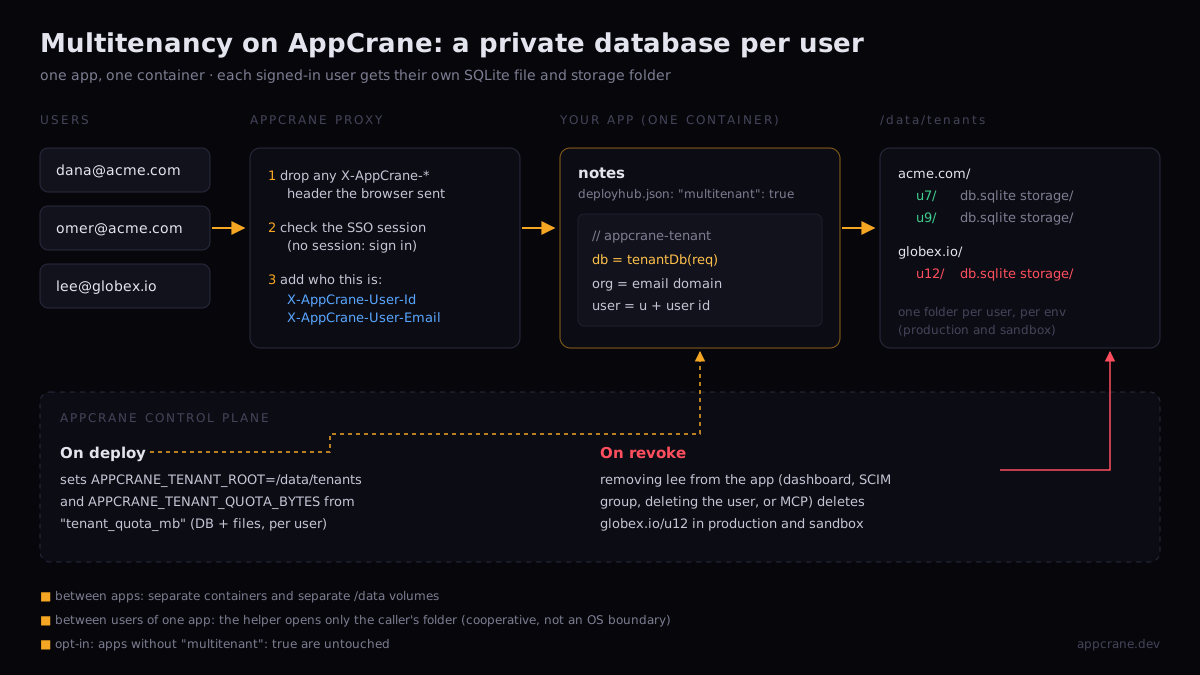
Most internal apps keep everyone's data in one database, with a user_id column and a WHERE clause that has to be right on every query, forever. Miss it once and one user reads another's notes. For apps where each user's data is their own, AppCrane offers a different default: each user gets their own file.
That covers a lot of what gets built on an internal platform: notes, drafts, personal dashboards, saved searches, uploaded documents, an assistant's per-user memory. None of it is shared, and all of it has to go when the person leaves.
What you write
One line in the app's deployhub.json, and an optional quota:
{
  "name": "Notes",
  "multitenant": true,
  "tenant_quota_mb": 50
}
Then open the caller's database from the request, instead of from a connection string:
import { tenantDb } from 'appcrane-tenant'

app.get('/api/notes', (req, res) => {
  const db = tenantDb(req)   // /data/tenants/<org>/u<userId>/db.sqlite
  res.json({ notes: db.prepare('SELECT * FROM notes').all() })
})
There is no tenant table, no filter on every query and no cleanup job. The app never learns another user's path, because it never builds one.
What AppCrane does
It says who is calling
Every request to the app passes through AppCrane's proxy first. The proxy removes any X-AppCrane-* header the browser sent, checks the single sign-on session (no session means a sign-in page, not the app), and then adds the caller's identity: X-AppCrane-User-Id and X-AppCrane-User-Email. The app does not parse a token or talk to the identity provider. Because the client's copies are removed first, a user cannot claim to be someone else by sending the header themselves.
It decides where their data lives
A tenant is the pair (organisation, user), and the organisation is the domain of the user's email. The helper turns that into a folder on the app's persistent volume:
/data/tenants/acme.com/u7/db.sqlite
/data/tenants/acme.com/u7/storage/
/data/tenants/globex.io/u12/db.sqlite
The volume survives redeploys, and production and sandbox each have their own, so testing in sandbox never touches real users' data. Files go in the same folder: tenantFile(req, name) reduces any user-supplied name to a safe file name inside storage/, so an upload called ../../etc/passwd lands as passwd in the caller's folder.
It limits how much each user takes
tenant_quota_mb becomes APPCRANE_TENANT_QUOTA_BYTES in the container. Call assertTenantQuota(req) before accepting a write; it throws once that user's database and files together reach the limit, and the app answers 413. One heavy user cannot fill the disk for everyone else.
It deletes their data when they leave
When a user loses access to the app, AppCrane deletes their folder in production and sandbox. It does not matter how the access went:
- an owner removes them in the dashboard
- an admin deletes the user
- the identity provider drops them from a SCIM group, and that group was what gave them the app
- an agent revokes them through AppCrane's MCP tools
The platform computes the folder with the same function the helper uses (it imports it rather than copying it), so the path it deletes is the path the app wrote.
Checking this post against the code, only the last of those four paths actually deleted anything. The dashboard, user deletion and SCIM removed access and left the data on disk, while the documentation promised purge-on-revoke with no condition. AppCrane v2.93.4 wires all four, with a test for each that fails when its call is removed.
Where the boundaries are
Isolation claims are only useful if they say what they do not cover, so here is the precise version.
| Between | What keeps them apart |
|---|---|
| Two apps | Separate containers and separate data volumes. One app cannot open another's files. |
| Two users of one app | The helper. It opens only the caller's folder, but the app is one process that could read any folder it chose to. |
| Production and sandbox | Separate volumes, so separate tenant folders. |
The middle row is cooperative isolation, and that is deliberate. A strict boundary between users would mean a process or container per user, and an app can have thousands of users. What the model guarantees is that correct use of the helper never mixes data; a bug that builds a path from user input can still cross the line. The rule is short: derive tenant paths only through the helper, never by hand.
A few more edges worth knowing before you design around it:
- It needs a signed-in user. A request with no identity, for example on a public custom-domain route that skips sign-in, makes the helper throw rather than fall back to a shared file. It fails closed.
- Organisation is a label, not a wall. Everyone on gmail.com shares the
gmail.comfolder name, but each still has their ownu<id>folder, so their data never mixes. - Per-user SQLite is for per-user data. Anything users share, such as a team's board or a company-wide catalogue, belongs in the app's main database, which AppCrane can provision as managed PostgreSQL, MariaDB or MongoDB for the app. A managed server database per user is not offered.
- It is opt-in. An app without
"multitenant": truegets no tenant folder, no environment variable and no purge. - The helper is not on npm yet. Copy
packages/tenant/index.jsfrom the AppCrane repository, or depend on it by path. The multitenant-notes example is a complete app.
When to use it
Use it when the sentence "this data belongs to one person" is true for most of what your app stores, and you want the offboarding answer to be "it is already gone". Skip it when users mostly share data, or when you need to query across all users at once: a SQL join across thousands of files is not something anyone should write.
For the apps it fits, the part you would otherwise write and get wrong, the per-user filter, the quota and the cleanup when people leave, becomes a line in deployhub.json.
AppCrane is a self-hosted platform for internal and AI-built apps. AGPL-3.0. Free. Runs on any Ubuntu 22.04+ server.