AppCrane: tech specs
Everything AppCrane does, how it is secured and how a deploy runs. The short version is on the AppCrane home page.
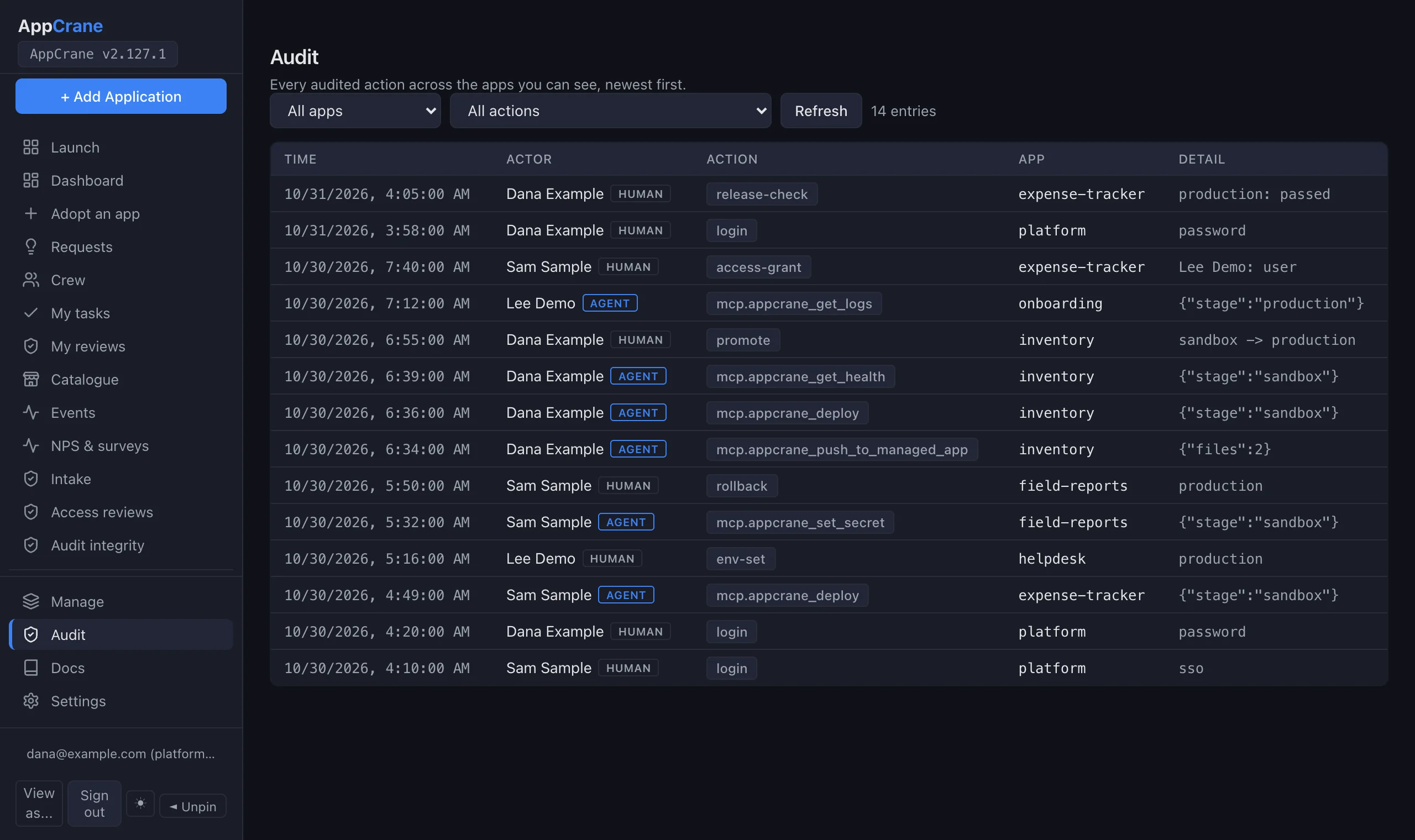
You stay in control: deploys go to sandbox by default, production needs an explicit per-app permission, and every action is logged per user and tagged agent or human.
On this page: The problem · Capabilities · SOC 2 and FIPS · More than deploys · Skiff · Bring your own agent · Compared · Workflow · Roles · Stack · FAQ
What goes wrong when
agents deploy.
- ×Secrets sit in a plaintext
.envthat anyone who administers the server can read. - ×Nobody can say who deployed what, or whether a person or an agent did it.
- ×Rolling back means rebuilding the last good version from scratch, in the middle of the incident.
- ×Apps share a database login, so one compromised app can read another app's data.
- ×The agent can push to production by default, because there is no other path.
- ×Logs live on a box the agent cannot reach, so it guesses instead of reading them.
AppCrane fixes each one on your own server: encrypted secrets the server operator cannot read, an audit log that tags every action agent or human, rollback that restarts the kept image instead of rebuilding, a separate database login for every app, sandbox-first deploys, and logs the app owner's agent reads over MCP.
Everything you need
to ship.
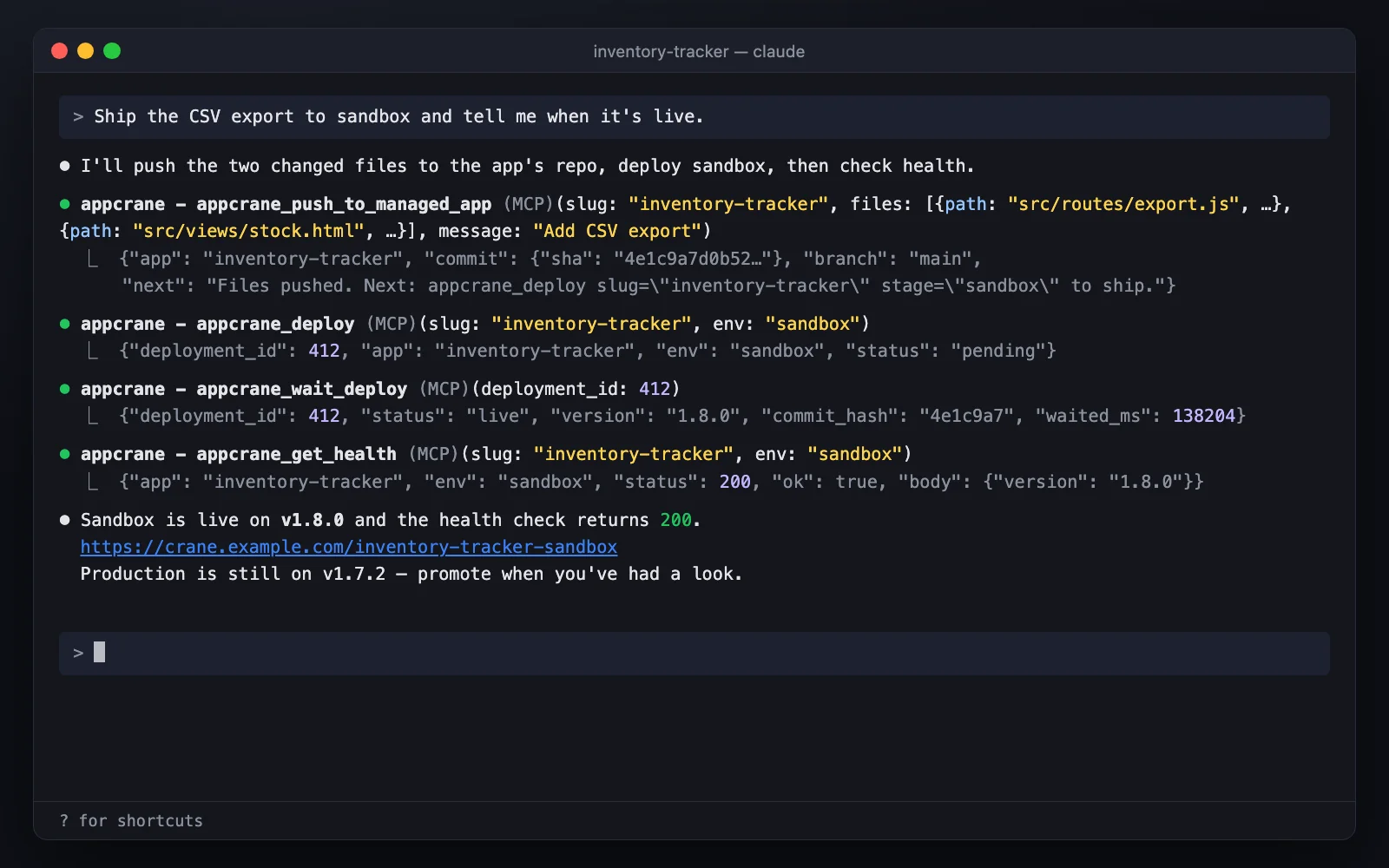
Build with Claude Code, Cursor or Codex, then let your agent handle deploys, secrets, GitHub branches, rollback and per-user audit. A full deployment platform on your own machine: no monthly fees, no vendor lock-in, no cloud bill surprises.
Agent-native. Your agent operates it.
The agent you already use drives the whole lifecycle over MCP, and every step is recorded.
Your infrastructure. Nothing leaves it.
One server you own runs every app, its databases, its sign-in and its backups.
Isolation by design. Apps stay apart.
Each app is walled off from its neighbours, from its own sandbox, and from the person who runs the server.
crane rotate-key, which backs up first and checks every secret before switching.deployhub.json is separate per stage. Sandbox code never receives production's database credentials.<app>.<your domain>, sandbox at <app>-sandbox), so one app's script cannot act as the visitor inside another app or read the AppCrane session. Old /<app> links redirect, apps need no change, and it needs a wildcard DNS record. Off until a platform admin sets the apps domain.Aligned with SOC 2. Evidence included.
Controls built to support SOC 2, a signed evidence pack mapped to SOC 2 CC6, CC7, CC8, A1 and C1, and a FIPS 140-3 mode. AppCrane is self-hosted software, so the SOC 2 audit is of your environment: AppCrane provides the controls and the evidence pack, not a SOC 2 report or a certification.
APPCRANE_FIPS=require, AppCrane refuses to start without a FIPS provider and a passing self-check. Secrets use AES-256-GCM, tokens HMAC-SHA256 and SHA-256, passwords PBKDF2-HMAC-SHA256, and MD5 is refused. On a FIPS-enabled host with validated modules you supply, it runs in FIPS 140-3 mode.More than deploys.
AppCrane now does the operational work apps usually have to build themselves — a one-click open-source app catalogue, domains, email, and disaster recovery.
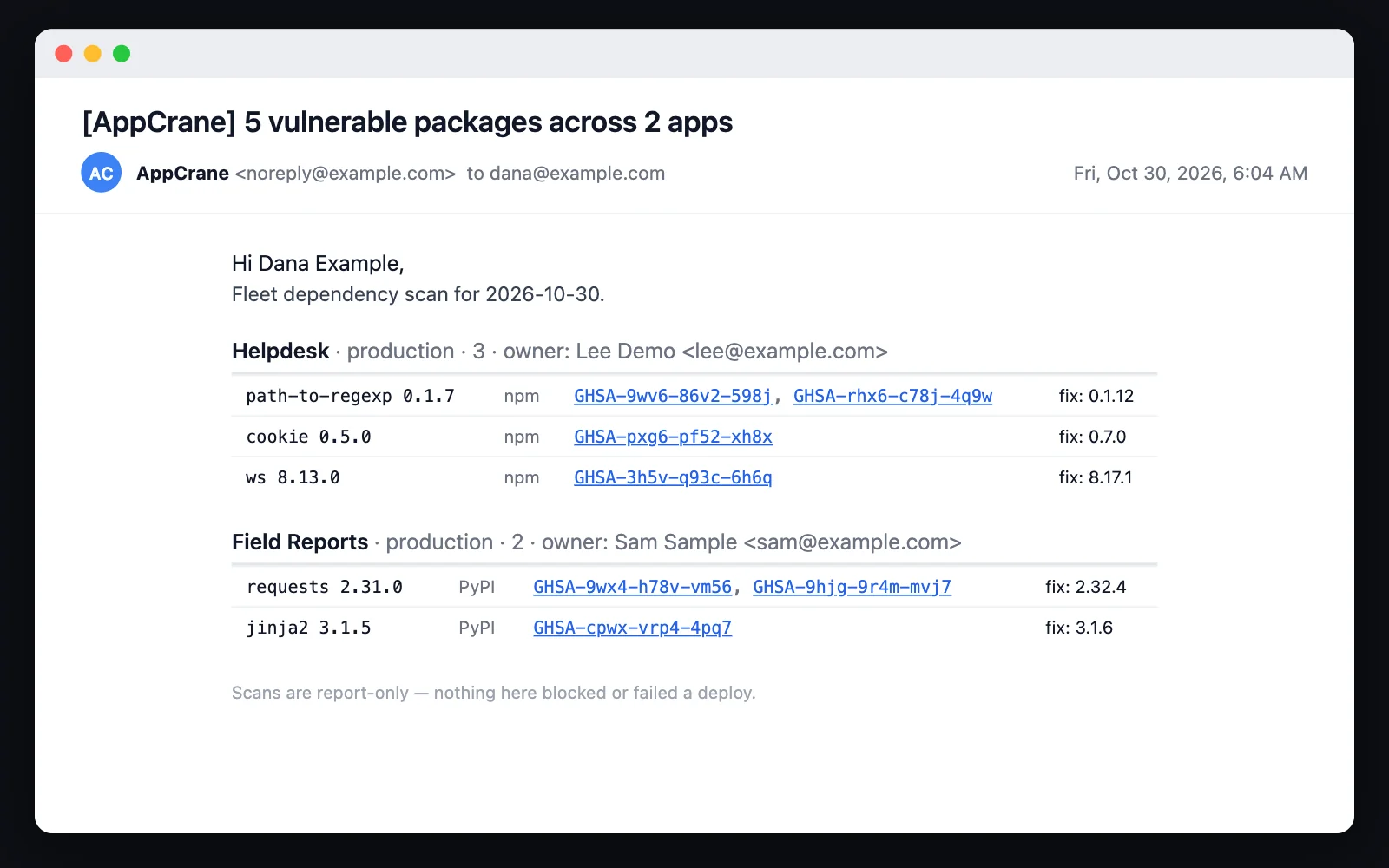
The apps you host are scanned, not just the platform
Every deploy scans what it just shipped and records the result against that deployment. Apps built from source are read from their lockfiles — npm, yarn, pnpm, Composer, Go, Cargo, RubyGems, pip and Poetry — and checked against OSV. Apps deployed from a container image are scanned against the resolved digest: the bytes actually running, not whatever the tag points at today. The scan reports and never blocks — a scanner that is missing, slow or wrong cannot fail your deploy. Apps are scanned again every day, so an advisory published after a deploy is still caught, and nothing has to be set up by the app’s team. A newly found vulnerable package is e-mailed once to the app’s owners and platform admins, and opens one request per advisory in the app’s queue; the request closes itself when no environment’s latest scan still finds it. By default the release check blocks production when a fixable vulnerability is found; admins can turn that off, and an app owner can record an exception with a reason that expires within 90 days.
Code-execution fixes ship on a written policy
When a scan finds a remote-code-execution advisory in an npm dependency with a published fix, RCE auto-patch (on by default) bumps only that package, tests it in sandbox, runs the release check and promotes it, rolls back if it fails, and e-mails the owners. It runs only when the branch matches what is live in production, so nothing unapproved ships with it; every other fix keeps a person’s approval. Every build also starts from a fresh copy of its base image, and when a serious flaw lands in PHP itself, AppCrane rebuilds affected PHP apps on the fixed runtime the same way. A platform admin can turn auto-patch off, and an app can opt out.
Deploy open-source apps in one click
Browse a curated catalogue of open-source apps — each showing its GitHub stars, latest version, size, and icon — and deploy one onto your own server in a single click. It runs in its own container on your box, behind your SSO and audit trail, with no vendor in the middle. Platform admins can switch the catalogue off in Settings.
Its own domain, its own front door
Serve an app on its own domain at the root — its own authentication, no AppCrane SSO or topbar. AppCrane stays the deploy, GitHub, and upgrade layer; only public serving changes. HTTPS is provisioned automatically.
Apps send mail, no SMTP
Hosted apps send email through AppCrane — async, server-side, automatically retried, with recipients bounded to your platform's users. No credentials live in the app; the sender name defaults to the app's name.
No GitHub account required
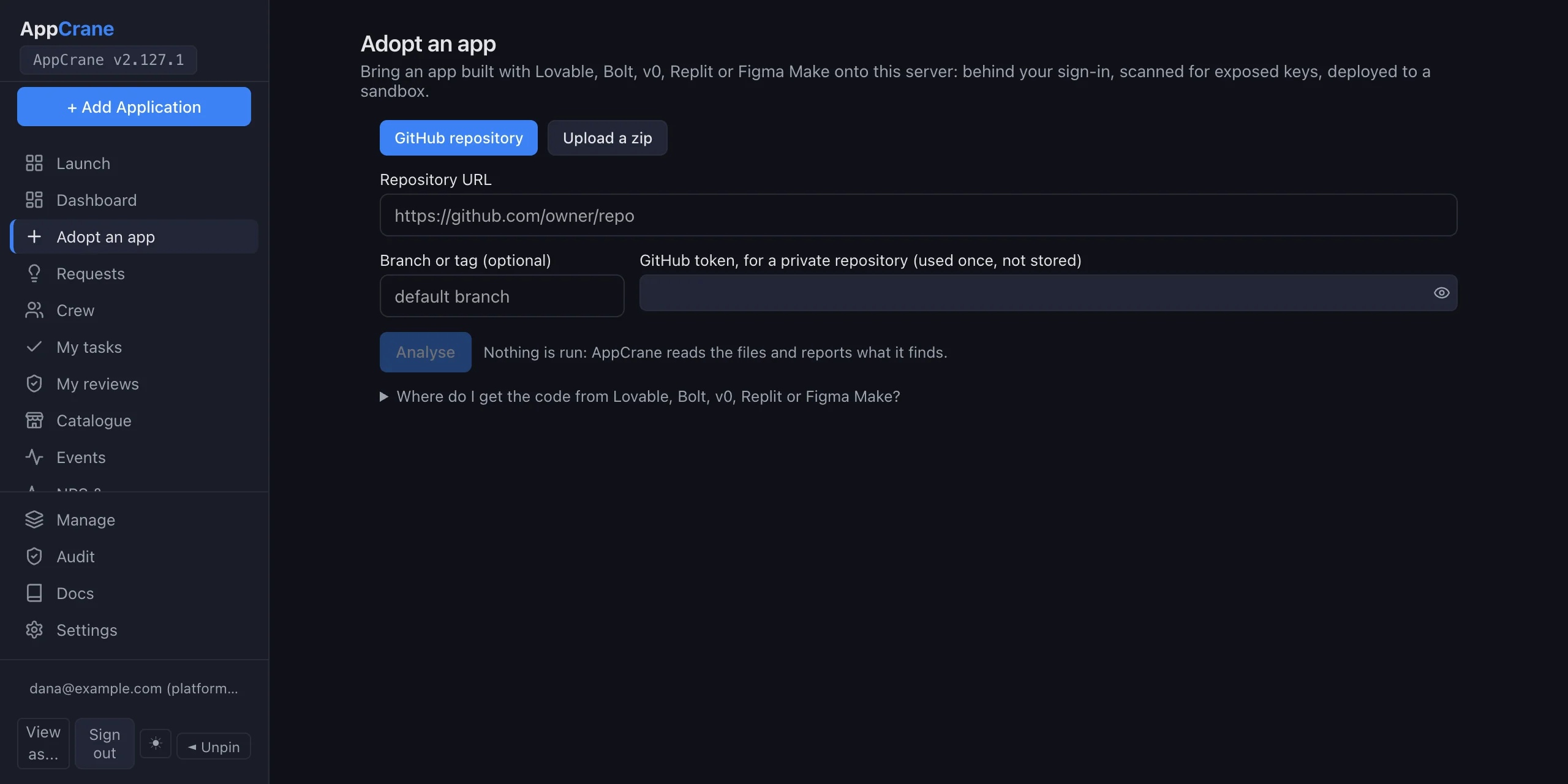
Choose "AppCrane manages my code" and the code lives in a private git repository on your AppCrane server, which developers can clone over HTTPS with their AppCrane API key — your users never need a GitHub account. Every deploy is verified against its commit SHA before the container swap.
One zip to stand it all back up
Package the platform's state — database, secrets, icons, per-app /data and every volume an app declares — into a single zip, then import it onto a fresh host. Container images are not in the zip; each app records the exact digest it ran, and a restore re-pulls those bytes from the registry.
Do you build one of these apps?
The rest of this page is written for the person running AppCrane. This part is for the person who maintains an open-source application that ends up on it.
A catalogue entry gets your app installed. Skiff is the next step: your app trusts the identity AppCrane already verified, so the user does not sign in twice and there is no second set of accounts to deprovision. It reads the roles it defines itself, sends mail without SMTP credentials, and gets a database it never provisions.
Every surface ships today, each one stands alone, and taking them changes nothing about how your app ships anywhere else.
The guide states every contract exactly — header names, values, absence semantics, endpoint shapes — so a coding agent has nothing to guess at.
https://raw.githubusercontent.com/
  gitayg/appCrane/main/SKIFF.md
Nine levels, from “it runs and it is listed” to per-tenant data. Take one, or take none — a listed app works without any of it.
Bring your
own agent.
No more in-portal coding sandbox. AppCrane exposes its operations as 74 MCP tools — deploy, promote, rollback, env, logs, access, scans — and, when the connection carries a GitHub token, GitHub itself. Connect the agent you already use, keep your local context and your keys, and drive your fleet from one place.
github_* tools — files, branches, pull requests, issues, Actions — from a GitHub MCP server AppCrane runs for you. Agent edits land on real branches and PRs, and a push to main still triggers the HMAC-verified webhook auto-deploy. Your reviews, branch protection and CI all apply.Ship inside your
client's infrastructure.
Embedded at a customer? Build with your agent, deploy on their own VPC or on-prem box — data never leaves their perimeter — and hand off something their team can run, with the SSO and per-user audit their security review already wants.
Why teams choose
AppCrane.
Self-hosted without the trade-offs. Enterprise features without the SaaS bill.
| Feature | AppCrane | Railway | Coolify |
|---|---|---|---|
| Price | Free (self-hosted) | $5–20 / app / mo | Free self-hosted; Cloud from $5/mo |
| Data ownership | Your server | Railway cloud | Your server |
| Docker isolation | ✓ per app | ✓ | ✓ |
| Enterprise SSO | ✓ SAML / OIDC / SCIM | ✗ | OIDC + OAuth providers |
| Agent control protocol | ✓ MCP on your server — any client | ✓ MCP, hosted | ✓ MCP on your server |
| Real-time presence | ✓ | ✗ | Not documented |
| Dual environments | ✓ built-in | Manual | Manual |
| Auto-HTTPS | ✓ Caddy | ✓ | ✓ Traefik or Caddy |
| Zero-downtime deploy | ✓ | ✓ | Rolling updates, not Compose |
| Scans the images it hosts | ✓ lockfiles + image digests | Not documented | Not documented |
| Vendor lock-in | None | High | None |
| Open source | AGPL-3.0 | ✗ | Apache 2 |
Deploy in five steps.
From fresh Ubuntu server to running app in under ten minutes.
Four roles.
One hard wall.
Platform Owner can never read app secrets — enforced at middleware, not by policy. The other three roles are app-scoped and configurable per app: App Owner decides exactly what App Admins and App Users can do inside their app.
- Creates and deletes apps
- Manages platform-wide users and SSO
- Views server health (CPU, RAM, disk)
- Configures branding and global settings
- Cannot read env vars or
/data/ - Cannot deploy, rollback, or promote
- Cannot configure or view per-app settings
- Assigns App Admins and App Users to the app
- Configures what each role can do (per-app permission grid)
- Full env var read and write
- Deploy, rollback, promote (sandbox → production)
- All app settings, backups, and audit log
- Transfers or deletes the app
- Configures health checks, webhooks, integrations
- Manages app-level settings and metadata
- Views logs and audit trail
- Env var read/write — configurable
- Deploy and rollback — configurable
- Backup create / restore — configurable
- Cannot promote sandbox → production
- Deploys to sandbox
- Views logs for own deploys
- Read non-secret env — configurable
- Write env / deploy to production — configurable
- Rollback — configurable
- Cannot access other apps
- Cannot edit settings or assign roles
Boring tech.
Reliable stack.
Docker isolation meets proven Linux tooling. No Kubernetes, no cloud sprawl — just a reliable stack running on your own server.
Common questions.
What is AppCrane?
AppCrane is an open-source, self-hosted platform for running the internal apps a team builds with AI coding tools such as Claude Code, Cursor or Codex. You install it on one Ubuntu server you own. Your coding agent then creates, deploys, promotes and rolls back apps through 74 MCP tools, while AppCrane puts single sign-on and per-app roles in front of every app, records each action against the person or agent that took it, and keeps app secrets out of reach of the person who runs the server.
What license is AppCrane under?
The platform is AGPL-3.0, with single sign-on, SCIM, per-app roles and the audit log all in the open-source build and nothing to activate. The appcrane-mcp connector your agent runs is MIT.
What does AppCrane run on?
One Ubuntu 22.04 or newer server, on a cloud VPS, in a private network or on-prem. The installer sets up Node.js 22, Docker and Caddy; AppCrane itself is Node.js and Express 5 with SQLite, each app runs in its own Docker container, and Caddy serves HTTPS with Let's Encrypt certificates. AppCrane deploys to the machine it is installed on.
What happens when the server runs low on disk?
AppCrane refuses to start a deploy, build or update when less than 5 GB is free, so a half-written release cannot fill the disk; rollbacks still run. The installer caps the system logs and keeps a 1 GB reserve file you can delete to recover. If an app's container disappears after a full disk or a reboot, AppCrane redeploys it from its live release within 10 minutes and e-mails its owners.
Is AppCrane free?
Yes. AppCrane is open source and free to self-host. You pay for your own server — typically $5–20/month on any VPS provider — and nothing else. There is no SaaS fee, no per-seat charge, and no usage billing.
How is AppCrane different from Railway or Coolify?
Railway is a managed cloud platform — your code and data live on their infrastructure. AppCrane runs on your own server, so you own everything. Coolify, like AppCrane, runs on your own servers, and both ship an MCP server that can deploy and roll back and an audit log that records MCP activity. AppCrane differs with SAML and SCIM alongside OIDC (Coolify documents OIDC and OAuth sign-in), sandbox-to-production promotion and per-app access grants an agent can drive, a secret hard-wall the platform operator cannot bypass, and real-time team presence — features aimed at teams rather than solo developers.
Do I need Kubernetes or container orchestration experience?
No. AppCrane uses Docker for process isolation but abstracts it entirely — you never write a Dockerfile or manage containers directly. There is no Kubernetes, no Helm, no cluster to maintain. If you can SSH into a Ubuntu server, you can run AppCrane.
Does AppCrane work with my AI agent?
Yes — if it speaks MCP, it works. AppCrane runs an MCP server with 74 appcrane_* tools — create, deploy, promote, rollback, secrets, logs, access, backups, scans — and, when the connection carries your GitHub token, github_* tools for branches and pull requests. Connect Claude Code, Claude Desktop, Cursor, Codex CLI, or any MCP-compatible client by adding AppCrane's MCP endpoint and your user token. There is no in-portal coding sandbox to learn — your agent stays in the environment you already use.
How does AppCrane track who did what?
Every MCP token is bound to a specific user. When an agent calls a tool, AppCrane records the user, the agent's client identifier, the app, the env, the action, and the result. The dashboard shows per-user activity in real time and per-user history in the audit log — so you always know which person was behind a deploy, even when an AI did the typing.
How does the GitHub integration work?
Agent edits go through real git, not a side channel. Add your GitHub token to the MCP connection and it serves github_* tools (files, branches, pull requests, issues, Actions) from a GitHub MCP server AppCrane starts for you, so the agent opens a branch and a PR with your own credentials. Push to main still triggers the existing HMAC-verified webhook auto-deploy. AppCrane never bypasses GitHub — your reviews, branch protection rules, and CI all apply.
How does Enterprise SSO work?
AppCrane supports SAML 2.0, OIDC, and SCIM provisioning. Connect it to Okta, Azure AD, Google Workspace, or any standards-compliant identity provider. SCIM handles automatic user provisioning and deprovisioning — when you remove someone from your IdP, their AppCrane access is revoked automatically.
Can the Platform Owner read my app's secrets?
No. Environment variables are AES-256-GCM encrypted at rest and the Platform Owner role is hard-walled from reading them at the middleware level — not by convention, not by policy. Only the App Owner (and the App Admins / App Users they explicitly grant via the per-app permission grid) can read or write app secrets. The hard wall holds even with shell access to the server: the encryption key lives in .env on disk, outside the Platform Owner's code path.
How are the four roles different from each other?
Platform Owner operates the server: creates/deletes apps, manages SSO, monitors hardware. Hard-walled from app data. App Owner owns one app end-to-end: assigns App Admins and App Users, configures the per-app permission grid, has full env / deploy / settings access. App Admin handles configuration inside the app: health checks, webhooks, metadata. App User is day-to-day developer access: deploy to sandbox, view logs. App Admin and App User capabilities are configurable per app — the App Owner decides exactly what each can do.
Can I customize what App Admin and App User can do, per app?
Yes. Every app has a Settings → Roles permission grid where the App Owner toggles which capabilities are granted to App Admins and App Users on that app — env var access, deploy targets, rollback, backup operations, and so on. Different apps in the same organization can run different policies. The only setting that can't be changed is the Platform Owner's middleware boundary — that's hard-walled in code.
Ready to
deploy?
One command. Your server. Your apps.